Monitoring Authentication Logs on RHEL 7+
Objective: Monitor and analyze authentication logs (/var/log/secure) on RHEL-based systems to observe login activity, sudo usage, PAM events, and user switching.
Topology:
- 2 lab systems: lab1 and lab2 (both running RHEL 8)
- 1 network switch connecting both systems
-
Step 1: Monitor incoming authentication logs on lab1
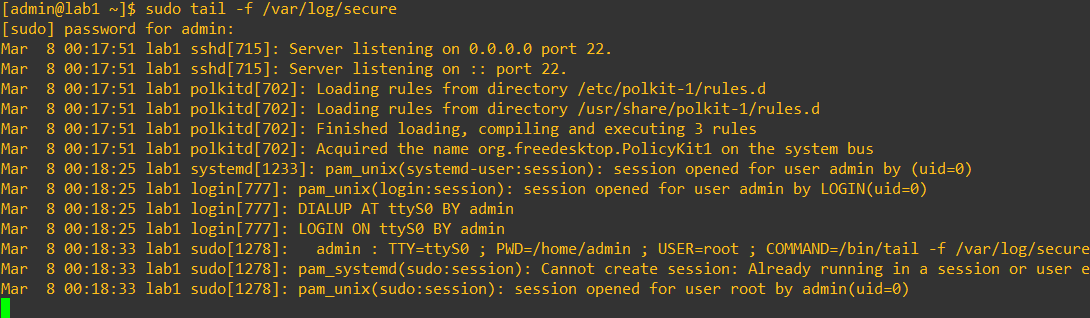
sudo tail -f /var/log/secureNote: Many messages may already exist in the log file. Observe the message generated by the sudo command you just ran. All sudo activity is recorded in /var/log/secure.
-
Step 2: SSH from lab2 into lab1
ssh admin@192.168.1.89Observe the output on lab1. New log entries corresponding to the SSH login session will appear.
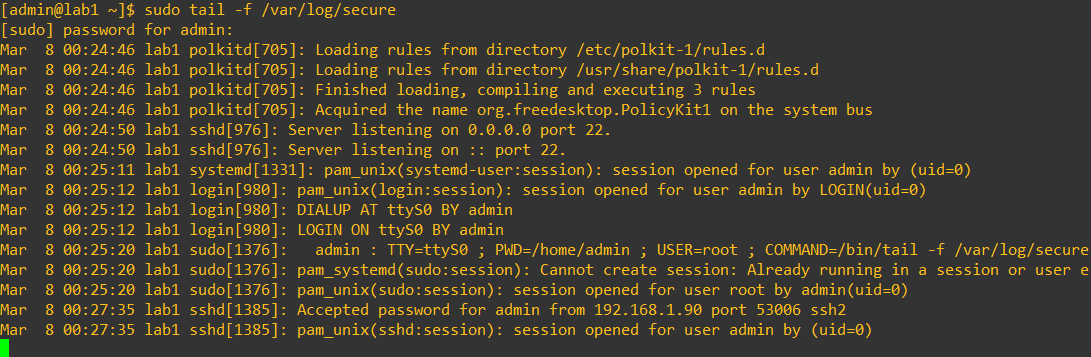
Note: SSH login events are logged by the sshd service through PAM. Logs include authentication results and source IP.
-
Step 3: Switch to a different user
su - rootObserve the new log messages generated on lab1.
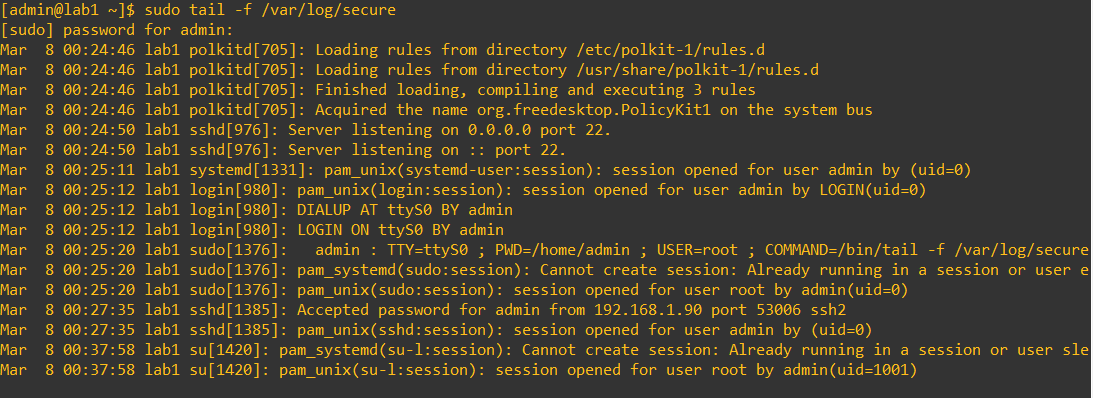
Note: Switching users via
suis logged in /var/log/secure. Session open/close events for root appear. Usingsu -starts a login-style shell but is not a full system login. -
Step 4: Generate failed login attempts
ssh admin@192.168.1.89Enter the incorrect password three times and observe /var/log/secure on lab1.

Note: Failed login attempts generate entries from sshd and PAM authentication failures.
-
Step 5: Check failed login attempts
sudo lastb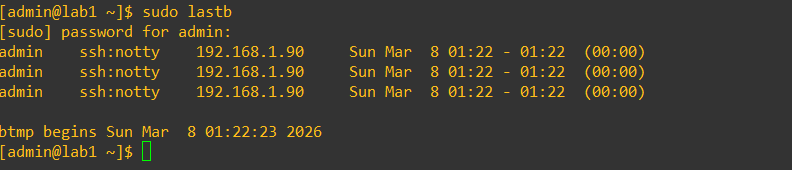
Note:
lastbreads /var/log/btmp (binary file) and shows failed login history. -
Step 6: Check successful login history
sudo last
You should see:
- A tty login (local terminal)
- A pts login (pseudo terminal, e.g., SSH from lab2)
Note:
lastreads from /var/log/wtmp, which is also a binary file. -
Optional: View authentication events in the system journal
journalctl
journalctl -f
Note: The system journal collects messages from the kernel and services. Many authentication events (SSH logins, sudo usage, PAM activity) appear here, similar to /var/log/secure.
-
Key Notes
- /var/log/secure captures authentication and authorization activity including SSH logins, local logins, sudo usage, su user switching, and PAM authentication events.
- This log is one of the first places administrators check for system access or suspicious activity.
-
Optional Commands for Practice
sudo grep sshd /var/log/secure sudo grep su /var/log/secure sudo grep sudo /var/log/secure -
Additional Notes: Log Message Structure
Entries in /var/log/secure generally follow this format:
[timestamp] [hostname] [process_name][PID]: [module/service]: [message]Example components:
- timestamp: Month, day, and time of the event
- hostname: Name of the system generating the log
- process_name[PID]: Process responsible for the message
- module/service: Authentication module or service (often PAM)
- message: Description of the authentication event (login, logout, sudo usage, etc.)
Optional: If auditd is enabled, /var/log/audit/audit.log provides more detailed
security auditing information, including file access, system calls, and
privileged actions. Because the audit system operates at the kernel level,
it can record security-relevant events that application logs may not capture.
These logs are commonly used for security auditing, compliance requirements,
and forensic investigations to determine what actions occurred on a system
and which user initiated them. The audit log complements /var/log/secure but
is not required for basic authentication monitoring.