Persistent NFS Lab
Objective: Configure an NFS share between two RHEL VMs (lab1 and lab2), mount it at boot, and control access with a dedicated group.
Prerequisites:
- NFS installed (see package management docs)
- Two RHEL 8 systems (lab1 and lab2)
-
1. Create an NFS group on the server (lab2)
sudo groupadd -g 12345 nfs1_user
-
2. Create the NFS share directory (lab2)
sudo mkdir /home/nfs1_share
sudo chown root:nfs1_user /home/nfs1_share
sudo chmod 2775 /home/nfs1_share
Note: The '2' in 2775 sets the setgid bit so files inherit the group.

-
3. Export the NFS share (lab2)
ip a
sudo vi /etc/exports
# add the line:
# /home/nfs1_share 192.168.1.0/24(rw,sync)
sudo exportfs -ra
sudo systemctl restart nfs-server
Note: Format: export_point client1(options) client2(options). Options 'rw' and 'sync' are recommended.

-
4. Create test users on the client (lab1)
sudo groupadd -g 12345 nfs1_user
sudo useradd user1
sudo usermod -aG nfs1_user user1
sudo useradd user2   # user2 is NOT added to nfs1_user
Note: GIDs must match the server for permissions to work correctly.

-
5. Verify NFS exports (lab1)
showmount --exports 192.168.1.92Note: You should see the exported share from lab2.

-
6. Mount the NFS share (lab1)
sudo mkdir /home/nfs1_mount
sudo mount 192.168.1.92:/home/nfs1_share /home/nfs1_mount
mount | grep nfs
-
7. Test file permissions (lab1)
Switch to user1 and create a file:
su - user1
echo "user1 made this" > /home/nfs1_mount/user1.txt
ls -l /home/nfs1_mount
Note: Files inherit the group nfs1_user because of the setgid bit.
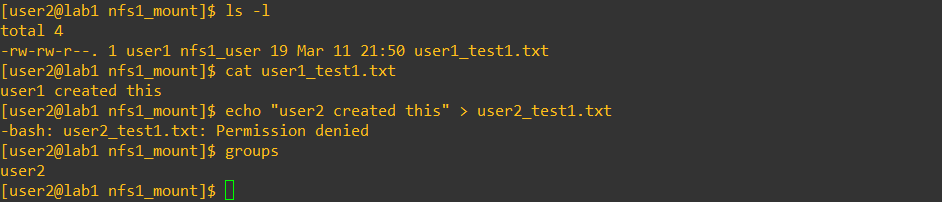
Switch to user2:
su - user2
cd /home/nfs1_mount
# Reading user1.txt should succeed
# Creating a new file should fail
Explanation: User2 is not in the nfs1_user group, so write access is denied.
-
8. Create a persistent NFS mount (lab1)
# Add to /etc/fstab
192.168.1.92:/home/nfs1_share /home/nfs1_mount nfs defaults 0 0

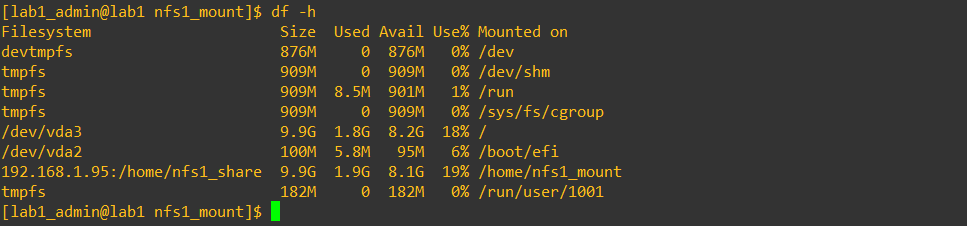
sudo mount -a
df -h
Note: Check that the mount persists after reboot.

Tip: Export options 'rw' and 'sync' are important:
- Without 'rw', even correct group members can only read
- 'sync' ensures all writes are committed immediately to the server