LVM Lab
Objective: Create, format, and extend logical volumes using LVM.
-
1. Locate the Device to be Used for LVM
lsblkNote: This lab uses
/dev/sdb, which shows a size of 40GB.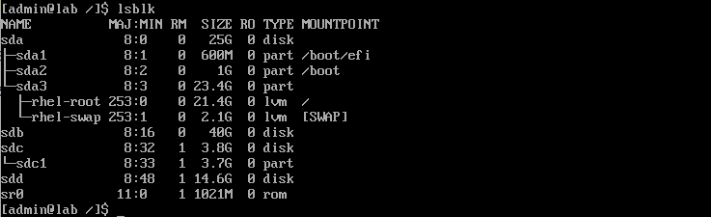
-
2. Prepare the Device for LVM
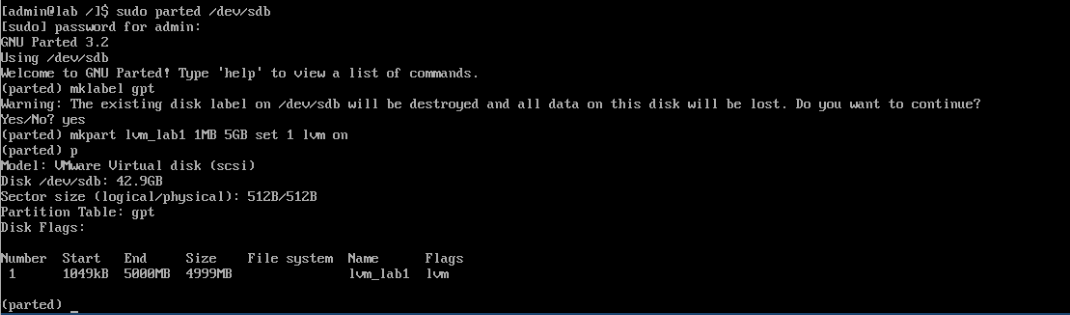
sudo parted /dev/sdbNote: Review available commands and arguments within
parted.Inside
parted:mklabel gpt mkpart lvm_lab1 1MB 5GB set 1 lvm onlvm_lab1= partition name1MB 5GB= start and end positionsset 1 lvm onenables the LVM flag on partition 1
-
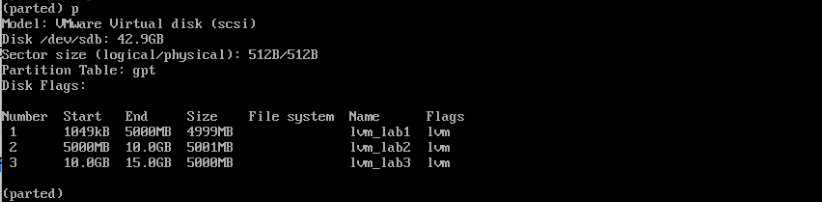
3. Create Two Additional 5GB Partitions
Create two additional 5GB partitions using the same method as above.
-
4. Exit parted
quit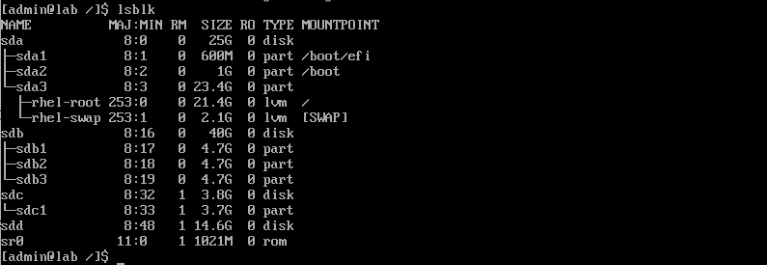
-
5. Verify the New Partitions
lsblkExpected Partitions:
/dev/sdb1/dev/sdb2/dev/sdb3

-
6. Create a Physical Volume
sudo pvcreate /dev/sdb1
sudo pvs
Note:
/dev/sdb1should now be listed as a Physical Volume.
-
7. Create a Volume Group
sudo vgcreate lab_vg /dev/sdb1
sudo pvs
sudo vgs
Note: Verify that
lab_vgexists and includes the Physical Volume.
-
8. Create a Logical Volume
sudo lvcreate -L 3G -n lab_lv lab_vg
sudo lvs
Note: The logical volume has been created but is not yet formatted or mounted.