Samba Server Setup
-
1. Install Required Packages
sudo dnf install samba samba-common samba-client -y -
2. Configure Samba
Edit the Samba configuration file:
sudo vi /etc/samba/smb.confAdd the following at the bottom of the file:
[Share]
   path = /home/samba
   browseable = yes
   read only = no
   guest ok = no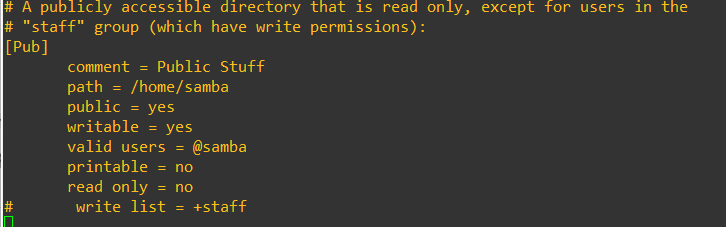
-
3. Create the Share Directory
sudo mkdir /home/samba -
4. Set SELinux context
sudo semanage fcontext -a -t samba_share_t "/home/samba(/.*)"
sudo restorecon -Rv /home/samba
-
5. Create a Samba User
sudo useradd -m sambaAdmin
sudo passwd sambaAdmin
sudo smbpasswd -a sambaAdmin
sudo smbpasswd -e sambaAdmin
-
6. Restart Samba Services
sudo systemctl enable smb nmb --now sudo systemctl restart smb nmb -
7. Connect from a Windows Client
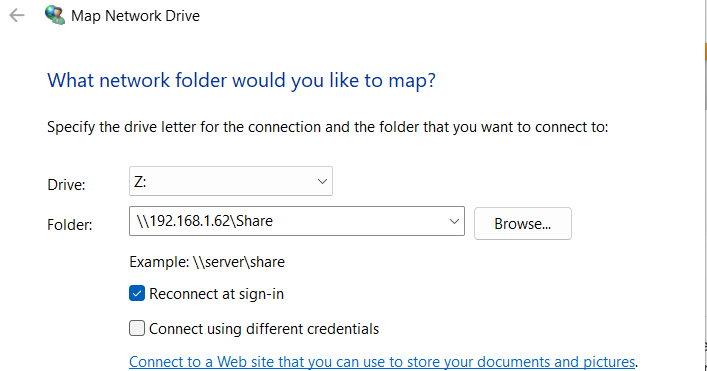
- Open File Explorer → Right-click This PC → Map Network Drive
- Choose a drive letter and enter network path:
\\<server-ip>\Share - Enter Samba credentials:
- Username:
sambaAdmin - Password: the password you set
- Username:
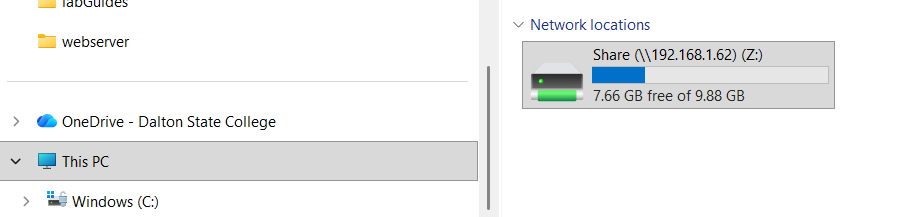
- You should now see the Samba share mounted and accessible.